
Sharing thoughts, ideas, and unsolicited advice about memoirs, journaling, and creative nonfiction.
Handling Paperwork the Old School Way
The virtues of "accession filing"
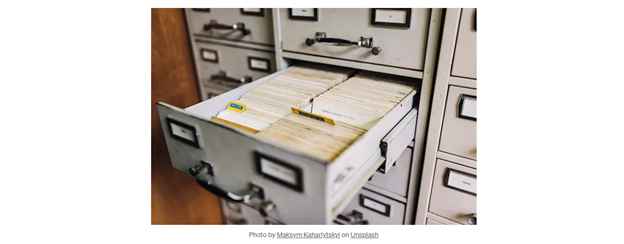

Awarning for all techies and minimalists out there: what I’m about to share will be of no interest to you. In fact, you may get riled up by the paperwork system I’m going to describe, for it will not decrease paper usage or your carbon footprint.
If you’re a late adopter like me who’s buried in paperwork, and suspects that the Cloud or one’s flash drive or some other external storage device isn’t as robust or secure as everyone says it is, my advice may save your sanity- and your piles of valuable information.
Many years ago, I attended church history classes near a local university. The instructor fascinated me for several reasons, one being the massive library he had crammed into such a small study, adjacent to his classroom.
Another interesting thing about him was his huge store of handouts, personal writings, newspaper clippings and magazine articles. At a moment’s notice he could produce an obscure article on the Kennedy assassination, little-known events from Martin Luther’s life, or chiasmus examples out of the Old Testament.
I asked how he could produce such a diversity of information on short notice. He showed me the filing cabinets in his office, then slid open a drawer at random and pulled out a file folder bulging with papers. He removed the first document and pointed to a handwritten number in the upper right-hand corner. This was the document’s number. He went on to explain that by using what he called “accession filing,” he could save himself a lot of time and headaches.
Thanking him, I went on my way, amazed at what this man had accomplished; he could store and retrieve thousands of documents with minimal effort. But since I was in college, and unable to store much at my dorm room, accession filing would have to wait.
Fast-forward a few years. Having attended a lot more classes and being a bit of a packrat, I’d accumulated a lot of paperwork. White papers, essays, class handouts, magazines, stories, pamphlets, and letters. Sure, I kept them in file folders, and had even acquired a file cabinet somewhere, in which I kept the hundreds of papers. But ask me to find anything, and one was in for a long wait.
Eventually, I got sick and tired of having so much inaccessible information, so I grouped articles by topic, then stuffed them into the same topical folder.
Well, that was all well and good until I discovered that most articles covered more than one topic. Unless I wanted to spend the rest of my days making multiple copies for placement in multiple folders, I was screwed.
Then I remembered my instructor’s system:
Grab a stack of twenty-five documents (or less, if some of the docs are voluminous)- as long as they fit comfortably into a file folder.
2. Write the number “1” in the top, right-hand corner of the first document.
3. Write “2” in the same location on the next document.
4. Proceed doing so with each succeeding document.
5. Stuff the stack into the file folder, in numerical order.
6. Write “1–25” (or 1–10, for example, if that’s how many docs are in the stack) on the front of the folder tab.
7. Place the folder in a file cabinet or document box.
8. Proceed to the next stack of documents. Begin numbering them where you left off with that last document in the preceding folder. (The key is to never add more documents to an already-filled folder. Just keep adding more filled folders to the end of the line.)
9. Using a blank index card, grab Document #1. At the top of the card, enter a topic that the document discusses . Below that topic heading, write the doc number and doc title. (Other info, like the author’s name, can be added later.)
Document #1 talks about the Crusades. Write the number “1” followed by “Why the Crusades Matter”.
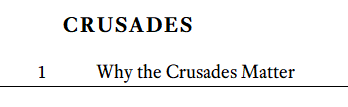
If the document covers more than one topic (which it usually does), grab another card and write the related topic (in this case, Pope Urban) as the header, below which you’d write “1” and the doc title.

Move on to Document #2. Maybe this one talks about continental drift- so you do the same thing with that article and the card or cards necessary.
10. Don’t worry about placing the Topic cards in any order yet. Just stack them in a pile for now. (First, you must create at least one topic for each of the documents. And yes, this is labor-intensive. But it’ll be worth the trouble, in the long run.)
When you’re done marking up the Topic cards, you’ll have a stack of file folders bulging with information. But you’re still wondering how the hell you’re going to find anything. Well, the secret to this system is the cards.
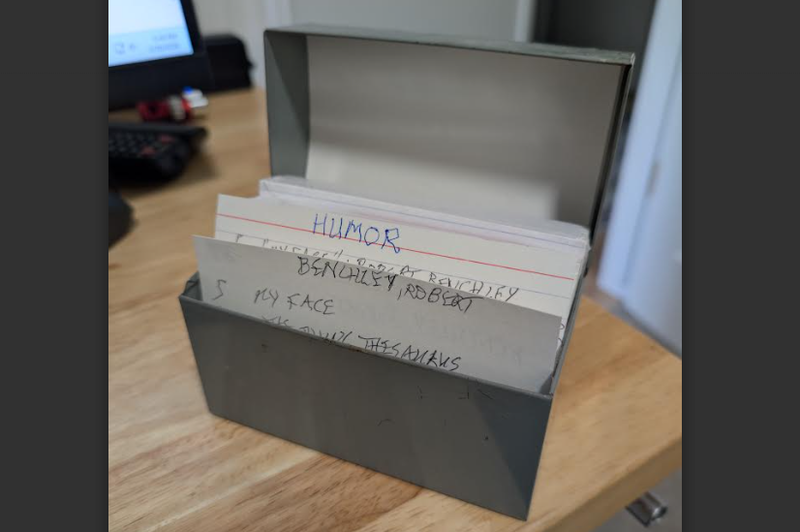
11. Sort the Topic cards alphabetically, by topic heading. Since there’s only one topic written at the top of each card, you’ll soon have the entire collection of documents organized is such a way that you can find any article in seconds.
For example, the “Continental Drift” card lists Documents 8, 57 and 213. “Pope Urban” is found in Docs 83, and 105. You get the idea.
The beauty of this system is that you don’t have to worry about folders bearing the names of hundreds of different topics; the cards do all that work for you.
And as you add more documents to the most recent folder, you add new cards- or entries further down in the respective cards. Enter as much or as little information to a card as you want to.
If you prefer an electronic file system, like Excel or Scrivener, this process works the same. But if you know someone who’s never going to use a computer, or seeks an alternative filing method, an accession file is the way to go.
Comments and questions are required welcomed. Ask me anything about memoirs, journaling or personal histories.

Comments
No comments yet. Be the first to comment!